Thanks for this spot Richard, I have now worked out what’s going on.
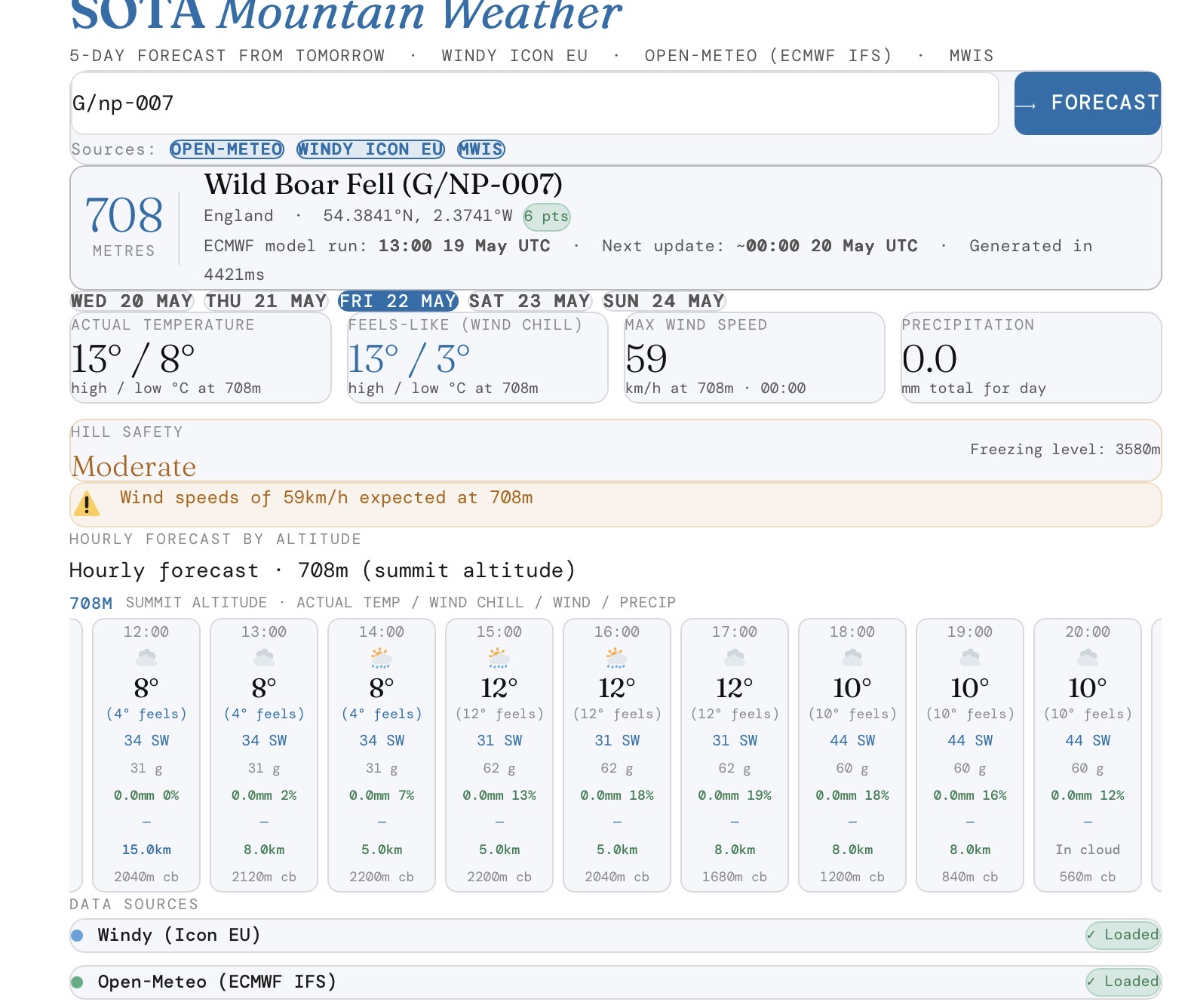
The challenge with blending models is some provide 3 hourly and some hourly. You can see from the latest update that it has sorted itself out. I think the lower temperatures were updated from the latest info at 3 hour resolution, and then later all of the hour slots eventually updated to the latest model run. It was more noticeable, I think because there was a significant change in temperature forecast between model runs. I need do some smoothing between updates I think.
1 Like
The weather scout app is giving HTTP 403 in its results box.
Thanks for spotting that, it was only returning results if logged in as admin, should be fixed now.
Thanks for fixing it so quickly.
Is it only looking at today when deciding which summits to list? I can get out on Thursday so I’d like it to look at the weather then.
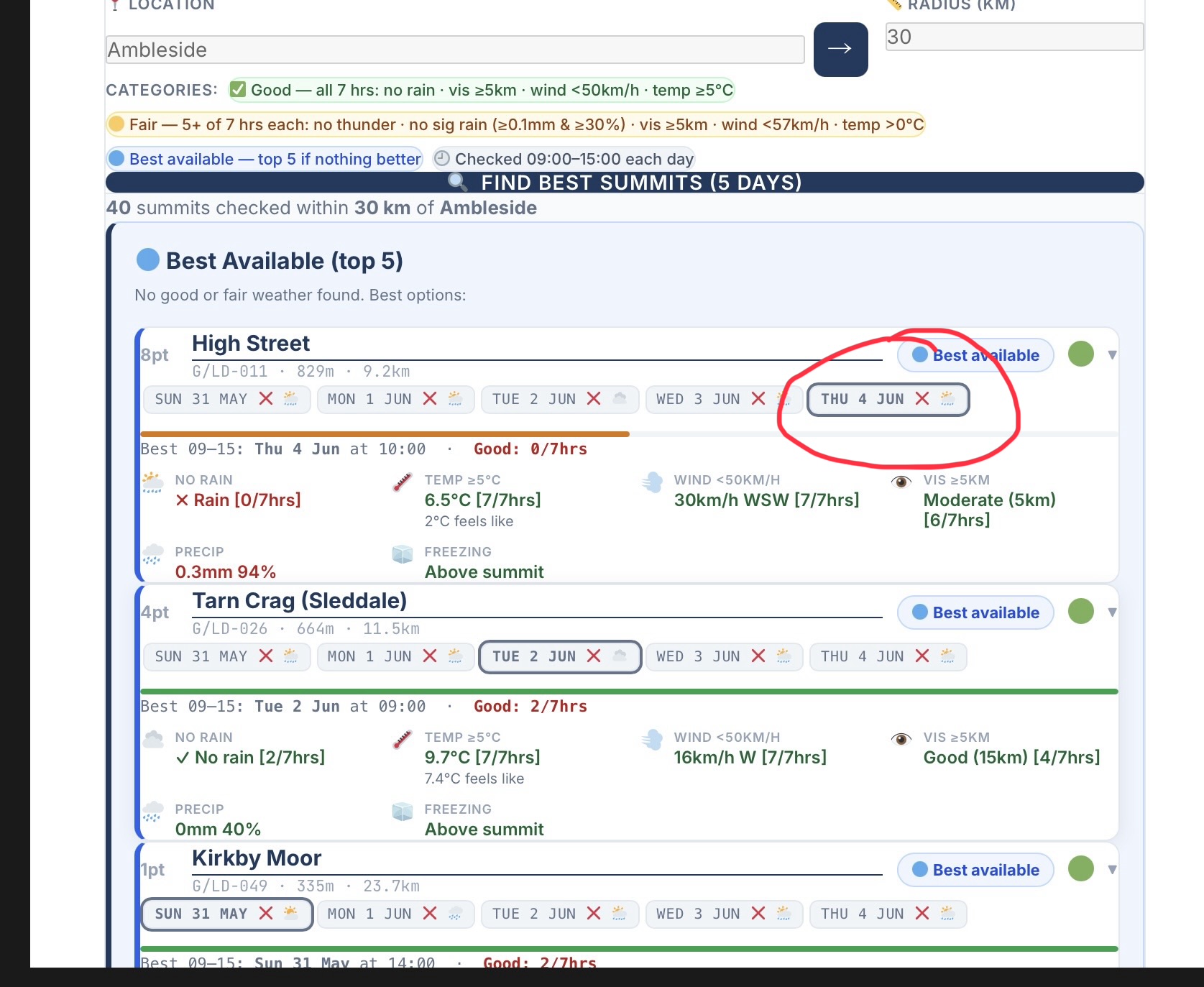
Yes you can select the day as circled in the screenshot below. It shows 5 days including today. If there are no good or fair forecast days , it will just give the best 5 summits of a bad bunch. You know the, Ok I know the weather is going to be rubbish, but what’s my best shot. That’s what the next 5 days for Ambleside is showing in the screenshot below.
Because it also shows today’s weather it is also looking at an 12 hour older weather model run, than the summit weather app. I have been using the scout to narrow down summits with possible good weather, and then using the summit weather to check the latest updates.
Edit: if it’s a wet week like next week, it won’t show many summits, you will something like 30 summits checked, but it may only show one or two summits that meet the criteria.
This explainer may help
But is it using Thursday’s weather to select the summits?
For each summit in the radius, it checks the weather for each day. So Thursday is actually the forecast for Thursday, Tuesday is Tuesday’s forecast etc. If there is a summit not meeting the criteria in the 5 day window it will not be shown. If no summits meet the criteria in the 5 day window, you get the best 5 summits.
1 Like
I should have RTFM…
I notice you don’t use wind gusts. I always look at the gusts for a summit to see how windy it will be. Not really sure which is the right approach.
I was originally using gusts, but most weather models return wind gusts at surface level. Trying to calculate gusts for a given altitude was giving unreliable results. I learnt the hard way why Mountain Forecast doesn’t show gusts 
1 Like
Been using this app a little recently and I have to say that so far its been spot on.
Worked well for NW-043 last Sunday.
What I have noticed that in the past few days, there is no temperature or wind information appearing.
Whilst not really neccessary for my epic mountain adventure to Billinge Hill this weekend, it was always a nice to see ( espcecially the wind).
Is it me or has one of the crossbeams gone skew on’t treddle?
Ian
Thanks Ian, the ECMWF IFS 025 does seem to be an accurate weather model, it is a 52 member ensemble model.
It does seem to be broken at the moment. I need to check the open meteo api, it’s returning a rate limit error (too any API calls), but my counter isn’t showing anywhere near the 10,000 daily call limit.
I am away with the grandchildren and so it will be later tonight before I can dig into it
1 Like
No worries, hopefully its something simple.
I’ll play with the other tools instead  - the line of sight calculator is my next target although I always seem to forget to check it before I go out and only remember when I get back
1 Like
Short version, I have a work around working for the single summit weather app
Long version.
There seems to have been some changes at hosting level. Outbound requests from my hosted Wordpress site, are now using a shared ip address. I am getting a rate limit from open meteo, even though I have rate limiting built into my code.
For the free open meteo api there is no key, daily rates are ip based. So ether another site using the same shared ip is abusing the rate limit, or the shared outbound ip has been blocked by open meteo.
The work around is to use a proxy on another server to make the outbound call.
Messy but a low cost option
2 Likes
Both weather apps now up and running again, using the new proxy server
1 Like