Fireforx 129 here on Windows.
The graph is animated as it loads, but only takes about a second.
There seems to be some lag though today where it just says “Loading QSO data…” for a couple of seconds, or gets stuck.
Fireforx 129 here on Windows.
The graph is animated as it loads, but only takes about a second.
There seems to be some lag though today where it just says “Loading QSO data…” for a couple of seconds, or gets stuck.
Replying to a post by @VK3ARR on Part 2 of this post:
presume there will be a way to select based on tags in the future (or have I missed it)
Yes it will be integrated with the SMP bits eventually.
Just want to double check - I clicked around sotamaps but didn’t find this functionality to filter summits by tag (e.g. only summits tagged " Disability Friendly" or only summits not tagged " Potential Access Issues"), has it been implemented yet?
If not, and if it’s as simple as needing a volunteer to implement it, I am willing 
It’ll be added to SOTAData3, not to SMP, because ultimately the SMP functions will be incorporated into SD3. There’s a bit to go on that in terms of unteasing some of the functionality in SMP, but also working out what is duplicated between SMP and SOTAData3/summits.sota, and what is still required.
SMP uses an older Google Maps API, and newer versions no longer support a lot of the functionality that SMP relies on to display information, so it’s not an easy lift-and-shift to a new version.
A bunch of changes have just been pushed for SD3, details below. Mostly under the hood, there’s a bunch of changes pushed now to help us with the transition from SOTAMaps (eventually) and provide some more functionality
Locations for Activator QSOs
Firstly, we now track activator QSO chaser locations in the following order:
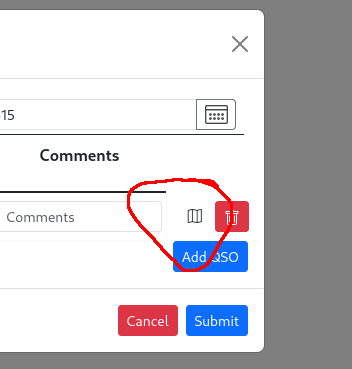
If you enter QSOs manually or via a CSV file, you can specify locations that are not S2S using the Add or Edit Activation screen, using the map icon at the end of the row:
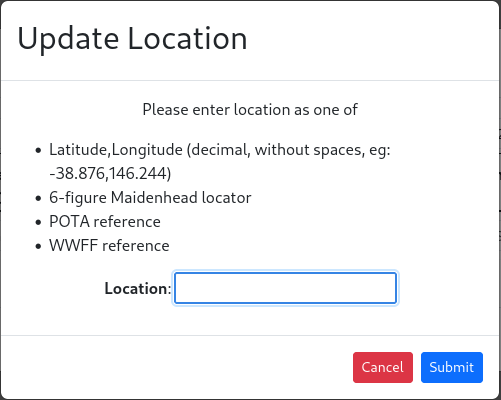
This will pop up another box to enter a variety of options:
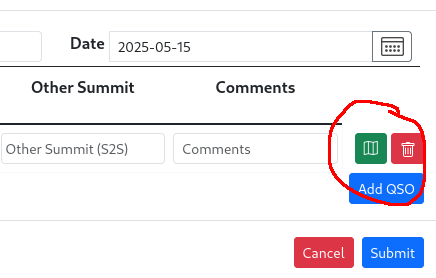
And finally on submit, will display a green map icon when there’s location data present.
Ultimately this will all feed into the QSO mapping features that come from SOTAMaps.
DXCC tracking and badges
Chasers within an activation now store DXCC so it is possible to do a DXCC set of badges for Activators similar to what is already there for Chasers.
The DXCC rules for SOTA activations are as follows (because I get to define them!):
5m and 8m bands added
It is now possible to add QSOs made in countries that have access to 8m and 5m. For SOTA award purposes, VHF is defined to start at 50MHz, so 5m will qualify for these awards, but 8m will not.
Silent fixes
The rest are not yet visible but will pave the way to further improvements.
Thanks Andrew for the great work that you do. Cheers 
Geoff vk3sq
These additions are great!
For DX badges will it compute the answers from old logs?
Likewise with mapping? Or is mapping new logs submitted/point forward analysis?
Shoudl be from old logs, but it won’t compute it until you upload your next one. I haven’t pre-emptively gone in and run the badging code for everyone.
For the most part it’s retrospective, but won’t go back eg, for WWFF/POTA stuff. Only for S2S.
I should add, there’s nothing stopping you going back to an old upload and adding in that data, which will persist going forward.
@VK3ARR - what is required in the ADIF for microwave contacts?
The .csv had a fancy QRA expression to allow distance calculations for frequencies > 1000 MHz.
Just use the ADIF fields for lat/Lon or gridsquare. At the moment the microwave code doesn’t look at the new location field so for belts and braces also copy into the comments field as per Andy’s documentation.
I can confirm this works - I uploaded an activation yesterday and was awarded a stack of DXCC badges but the dates were backdated.
Sorry if this was covered earlier, the search isn’t bringing up any results for it…
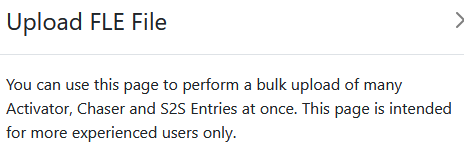
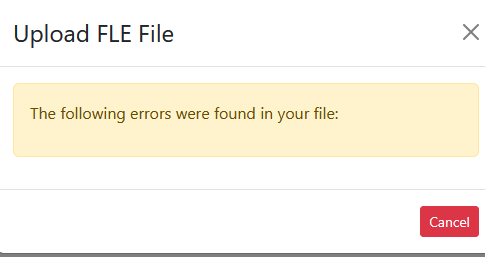
Can you bulk upload chaser contacts in FLE format? The popup says that you can:
but when I upload a log the validation fails because it thinks it’s an activator log and there is no summit reference (mysota) in the log. Is there a way around this?
If I use FLE to export to ADIF, then import the ADI file it works fine.
Example file below - just a test before typing up all of them!
# Header
mycall mw0pje/p
mygrid io83ke
# Log
date 2026-05-02
40m ssb
1428 m1tjm g/ld-014 44 55
29 m0pvc g/ld-014 44 55
The popup was cut and paste from the CSV one 
The FLE format doesn’t really support chaser logs, because of the way the format works and what is supposed to be a “correct” SOTA log (it’s basically a state machine with each entry altering the state). However, we’re a bit lax in what we accept, so you may be able to imitate it by not setting mysota and using the S2S format within the QSO itself, but I haven’t tested that it works.
Edit: oh, you tried that. Never mind, I will take a look at some point and see if I can make that work.
I’ve got quite a few to type up.
If bulk FLE chaser imports is implemented by the time I’m done I’ll do that, if not I’ll export to ADIF - it’s only a couple of extra clicks.
I always do this in FLE because I can then upload to POTA, import into Log4OM, upload to LoTW etc.
I have found some odd behaviour by the log upload process for ADIF recently, but when retried and finding it works fine, I decided I must have selected the FLE upload.
What I got was a message like “Your file has missing data”. And that’s all.
I suspect it is looking for the standard headings in an FLE text file like Mycall Mysota etc.
However the error message is not useful as it gives no hint as to just what it is objecting to.
My method of working out what the problem was, was to try the csv upload, which worked fine. So I deleted that and tried the ADIF again. Worked normally as usual.
73 Andrew VK1DA/VK2DA
A (one-liner) fix should be building and available in a few minutes. It passes some basic tests in the test harness, but I haven’t fully exercised it, but give it a try and see how it goes.
I tried the test below and it fails validation again because there is no summit in the header (mysota). Did I forget to add something?
# Header
mycall 2w1pje
mygrid io82lx

# Log
date 2026-05-04
2m ssb
1000 m1abc/p g/sp-015 59 59
1010 m1xyz/p gw/nw-066 58 58

date 2026-05-05
2m ssb
1000 g1xyz/p g/sp-015 59 59
1010 g1abc/p gw/nw-066 58 58
If I change the header as below, I get a different message.
# Header
mycall 2w1pje
mygrid io82lx
mysota
The missing keyword may be “Operator” or similar keyword to indicate who was making the contacts.
For sota activations, a keyword required is Mysota which names your SOTA reference.
The doco gives some other examples.
No, I found another issue, partly the test harness’ fault. Should be fixed now. I’ve also in the process of testing that, fixed another issue on ADIF/FLE uploads with time formats being displayed that weren’t specifically hh:mm style.