SOTA Mapping Project - small update

In reply to DM1LE:

I could make it happen, Stephan - don’t tempt me!

Now, I was wondering when an observation on the theme of activations/terminator was going to make an appearance, and you win the prize! No, one can see the present terminator in the activations page as an indication of how things would look if you were to make that activation now.

However, I’m thinking along the lines of a button somewhere which would “turn the clock back” to the time of the QSO, and show the terminator for that particular time. Take a little work, though, and not the highest of priorities. Not as high as GETTING ACCESS TO THE LIVE ACTIVATIONS DATA!!!

Do you think they heard me that time? And “they” know who they are ;-)…

Thanks and best regards, Rob

In reply to DM1CM:

Rob thanks for all the updates you’ve been doing on the SMP.
It has saved me a lot of work as the process I had for creating similar activation maps was quite labour intensive!

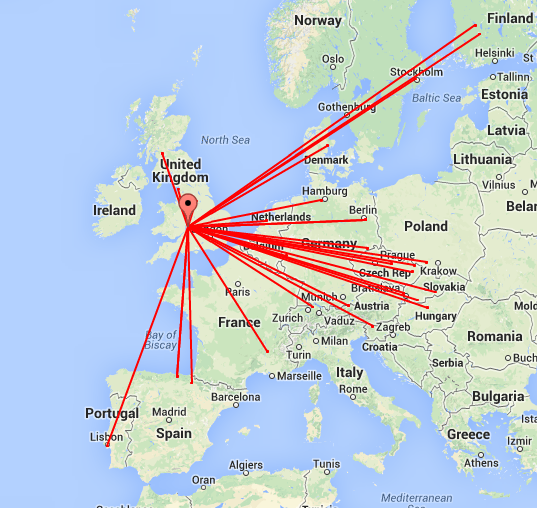
I’ve now started embedding your maps into my blog rather than my “homebrew” ones, e.g.

The only small suggestion I could make to improve it is to either being able to customise the line width or making them thinner by default.
I think thinner lines like I’ve used here

are less cluttered when there are lots of contacts displayed.

Thanks again for all your hard work.

All that’s needed now is ACCESS TO THE LIVE ACTIVATIONS DATA :slight_smile:

Pete

In reply to G4ISJ:

Pete, implemented user-choice of normal/narrower line-widths - let me know if this is OK.

I’ll also give the user the choice of normal/small round points as chaser markers - at the moment they may look a bit “blobby” for some tastes and for some purposes…

Rob

PS - Looking forward to ACCESS TO THE LIVE ACTIVATIONS DATA… 8)#

In reply to DM1CM:

In reply to G4ISJ:

Pete, implemented user-choice of normal/narrower line-widths - let me
know if this is OK.

Wow, that was quick!
Many thanks Rob, that’s brilliant.

Cheers
Pete

There’s been a job for me to do in the SMP which I’ve been putting off for quite a while, but I’m now getting round to it. The job? - deleting, from user-defined tracks, data which fit the following categories:

(1) descent-stages of tracks which perfectly mirror the ascent: a pointless doubling of data, and a mark of laziness on the part of the user in not reading the Tracks Help, and not editing the GPX file to eliminate such data;

(2) road-routes or sections recording driving-to-the-start-of-your-favourite-route: most of us know how to drive, and we can choose our own driving route to the start of the hike. More useless data as far as SOTA, and the SMP database, are concerned…

There are quite a few of category (1), mostly from just a very few activators; and in a cursory inspection of tracks, I’ve spotted at least two of category (2). The latest, and surely the most noteworthy, of these involves a full 40 kilometers (!) of driving on city roads, motorways, major state highways and country roads to reach the car-park where the hike begins. The hike itself is about two kilometers, with an ascent of just over 300 meters. Unfortunately, the GPS track in the hiking section suffers from a lack of positional accuracy (hillside reflections?), so it’s not very useful. Nonetheless, I’ll leave that section in as a general guide to hiking up that summit.

Which is all a preamble to this:

PLEASE don’t include in your uploaded GPX tracks any descent sections which simply repeat the ascent.

PLEASE don’t include ANY sections recording your driving to the car-park from which you start your hike.

The ONLY exception to not including driveable, off-road, sections is where you have used a bicycle (or a horse, roller-skates, unicycle, pogo-stick, etc.) to negotiate that entire section. A good example of this would be the route recently uploaded by Jana DG5WU to OE/TI-321, where she states explicitly that the long (19km) trail leading to the ascent (not open to normal road traffic) was done on a bicycle hired in Scharnitz. I can tell you from my own experiences of hiking that trail that a bicycle is definitely the way to go there! So, that particular trail+ascent is perfectly acceptable as a SOTA/SMP track.

Enough from me - thanks to all who have uploaded tracks. With well over 500 tracks now in the system, it’s proving quite popular…

Best regards, Rob
In reply to DM1CM:
Sounds like common sense Rob and as you say the “out and back” piece is in the guidance notes.

Hopefully I haven’t inadvertently done it with any of mine.

73
Gerald
MW0WML

One addition and one bugfix:

  1. added the facility in the “main” page to display single or multiple SOTA regions borders in a more informative manner than before;

  2. fixed a bug where user-defined waypoints were not being shown for user-drawn tracks. This used to work, but after I changed some stuff a while ago, it stopped working, but I didn’t notice :/. And nobody told me, even though a few users have been adding waypoints to their drawn tracks. Works now, including graphics/pictures uploaded by the user as part of his/her drawn track. Try some of the tracks by Manuel CT1BWW to see how this looks…

Please, if anybody finds bugs, or something in the SMP doesn’t work: let me know!

Thanks and best regards,
Rob

In reply to DM1CM:

Please, if anybody finds bugs, or something in the SMP doesn’t work:
let me know!

Rob,
I don’t know that it’s a bug, but there is something really strange about the Streetview representation in SMP.

If you position yourself to look along a perfectly straight road on minimum zoom, and then rotate round 45º, the road behind you appears to go off at 90º not 180º.
You can in effect see straight ahead and directly behind all at the same time.
If you’re at a cross roads it’s impossible to tell where the road is!

This does not happen in Google Maps as I normally revert to looking on there when route planning as otherwise the SMP version numbs my brain :slight_smile:

Thanks for the great updates.

Pete

In reply to G4ISJ:
Zoom in a little and it’s fine.

Andy
MM0FMF

In reply to G4ISJ:

Hi Pete - well, Andy got in there before me!

As he suggests, use the Streetview zoom control to set the zoom factor to a level which is most appropriate for whichever part of the view you are most interested in. And, for what it’s worth, the SMP Streetview functions in exactly the same way as the Google maps Streetview, since they are precisely the same object.

The zoom in Streetview is actually a little peculiar, in that it doesn’t function exactly like a zoom lens on a camera. The camera lens is - well, lens-shaped, or lenticular - and the zoom compresses in all X-Y directions in the field of view. The Streetview zoom compresses only in the X direction, so zooming right out doesn’t give a nearly-fisheye view as, say, a 18mm super-wide angle camera lens would do. If it did, that really would numb the brain!

Anyway, you’ve prompted me to take another look at the Panorama (Streetview) window, which is something I’d been meaning to do for some time, so thanks for bringing it to my attention. The window now features a better aspect ratio, plus a resizing control, allowing the user to - resize the window!

Best regards, Rob

On the subject of waypoints, which I mentioned yesterday as now being displayed, I had thought this would only apply to user-drawn tracks, and not to uploaded GPX tracks.

How wrong can one be? I’m delighted to say it also applies to those uploaded GPX tracks which have waypoints defined - check out, for instance, some of the newest tracks from W5SMD or VK1NAM to see this working. Just shows how easy it is to forget what runs under the hood… If your GPS-derived tracks don’t yet have waypoints, just turn on the feature in your GPS device.

Rob

In reply to DM1CM:

Hi Rob

I noticed tonight when adding a GPX track to the SMP that previously summits which had tracks uploaded were in bold type, and they really stood out - a very useful feature when scanning the listings. Now all summits remain in standard type even though they have one or more tracks in the SMP database. I checked this on two different browsers, same situation, so something has changed.

73 Phil

There’s an update to the SMP “Position” control at the top of the map area.

Previously, when this was activated, a Maidenhead Locator grid was shown and controls at the bottom of the map area were displayed: both were either on or off. Now, one can choose to display grid and/or controls as desired.

Also featured is a brand new Latitude/Longitude grid which some may find useful or of interest, especially when checking positions of summits.

Rob

Another update to the SMP: this one is intended as a replacement for the “Measure” functionality in Google Maps, which disappeared when Google decided recently to update their Maps. And am I the only one who dislikes the new Google Maps format??!!

Anyway, to find the new tool, open the “Range” page, and click either on the “Measure” button, or the “ruler” map-tool in the lower lefthand corner of the map area. Activate the “Manual” tab-page (if it’s not already active) in the window, and away you go.

Rob

There was a question a couple of days ago in the nasota Yahoo group on whether it was possible to pre-select a user-defined set of associations and regions on loading the SMP “Main” page, by including some string in the page URL.

My immediate answer to the group was: “no, and it won’t be implemented any time soon”. Upon reflection, and taking a look at the code, I realised it wouldn’t be too difficult a task, and a couple of hours of work has now made it possible.

This new functionality is activated by including a string like “rgnlist=comma_delimited_list_of_regions” in the web-page URL, as in this example:

http://sotamaps.wsstvc.org/index.php?rgnlist=W4C/EM,W4C/EP,W4G/CE,W4T/NB,W4T/RV

  • no spaces, and no other GET-fields. One person at least will be happy with this update…

Rob

In reply to DM1CM:

“rgnlist=comma_delimited_list_of_regions” in the web-page URL

Not working here yet, so I’m guessing it’s not yet on the live server, but it’s a good idea, and I’ll use it for a bookmark or three. Thanks. :slight_smile:

73, Rick M0LEP

In reply to M0LEP:

Hi Rick,

Works OK here, as an example here is the url for G/SP & G/NP summits:

http://sotamaps.wsstvc.org/index.php?rgnlist=G/SP,G/NP

Thanks & 73,

Mark G0VOF

In reply to M0LEP:

Just do a Ctrl+F5 (doesn’t work in Safari) in your browser to pull the new code - should work then.

Rob

After that little exercise, I’ve also simplified the way a particular summit is pre-selected on “main” page-load (MT take note) as in this example:

http://localhost/wsstvc_sotamaps/index.php?smt=DL/BG-060

The old way still works of course, but is very much a fossil from the earliest attempts at writing the SMP, has always struck me as being rather unwieldy, and contains too much redundancy.

Rob

PS - update - see note below…
PPS - link also retro-edited to make it work :}

In reply to DM1CM:
Took a couple of force reloads to get the various caches down the line to update, but working fine now. Thanks.

http://sotamaps.wsstvc.org/index.php?smt=G/SE-005 is good, too.

73, Rick M0LEP

(Retro-edited so link still works!)