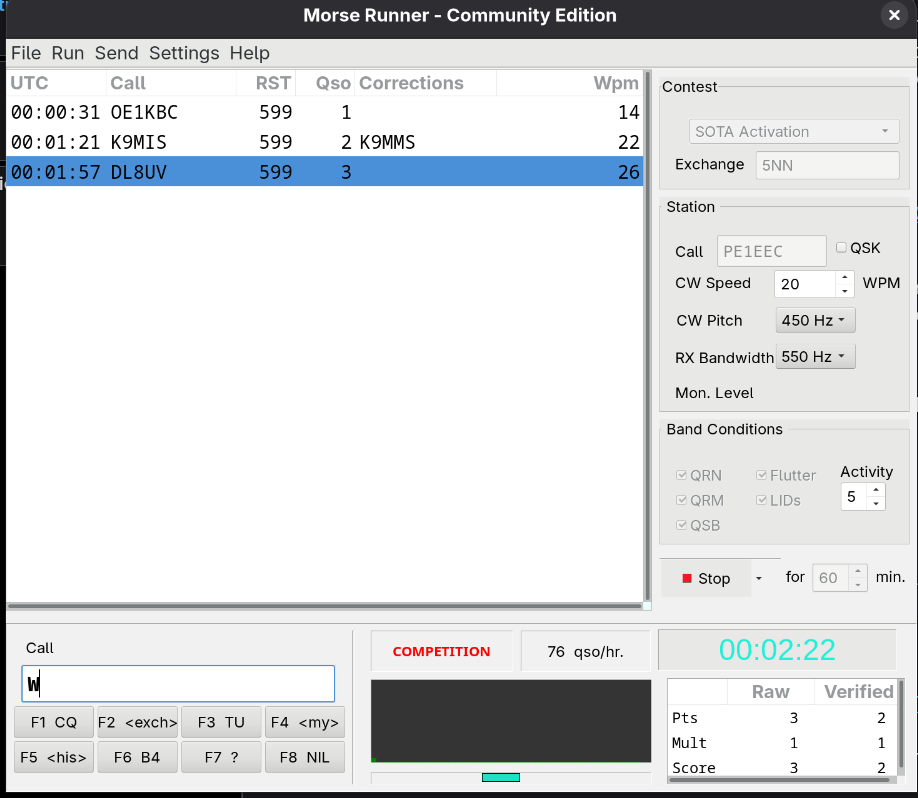
I am slowly moving towards Linux (Fedora). I know that one can run Windows programs with an emulator, but I thought it more fun to try and have Claude port the MorseRunner Community Edition (W7SST’s port of VE3NEA’s fantastic program) written in Windows Pascal code to Linux. Lo and behold, in two tries it seemed to work. Then I thought to do something more useful with it, and asked it to add SOTA to the activities. And it did! I told it to use the ON6ZQ SOTA CW particpants list, so now I can do some proper training on real SOTA calls with only the call + 599 as exchange. In the next phase I will extend it to include reference exchange as well to simulate S2S.
Hi Geoff. No real reason. I am learning some programming and a websearch lead me to Fedora as one of the best environments for programmers. Although that answer mght be biased by the Linux-geeks as Linus Torvalds likes it as well.
In using Debian for 30+ years. For long time I used Wine emulator.
Nowdays I use Steam and Proton compatibility mode. MorseRunner, TR4W,…they all run perfectly with no hassle.
Proton is modern version of Wine. It works very well with almost all Windows games on Linux - convert Windows graphics code DirectX into a format that Linux can use Vulkan.
So it works with almost all ham radio apps too.
Install Steam, make an account an add non steam app (icon bottom left). Then right click on added app and select Compatibility mode - proton.
I fount this the easiest way to run Windows programs under any Linux distro.
It now does S2S too. It simply assumes that call with a prefix or certain suffixes are also SOTA activators, and then picks a summit (determined via their prefix and correlated with the city.dat file). The received RST is random and the sent RST is auto-generated (rather intelligently I must say as very weak stations are given 339). Exchange needs to be correct to receive a point: only RST for chasers, or RTS + summit for S2S.
For non-gaming I find that bottles is a rather good way to run windows programs on Linux (mint). You can tailor each bottle separately to the needs of the windows program including rather old programs. Winlink and Vara run fine, as well as the original morse runner…..
I ported it to Windows as well, so it should cross-compile. The result looks like this https://youtu.be/-99KbV2rVvs S2S exchange at the end. Testing time starts…
Longer than me I’ve had Linux (and Windows) at home since 1999 and Debian machines since 2003/4 at home. First used Unix on a PDP-11 in 1983 and used Unix/Linux most of my working life along with Windows.
I finally dumped Windows as my main home OS Aug 2025 and now my main desktops and laptops all run Debian 13. My gateway runs Debian 12. The SOTA cluster and SMS spotter VM runs Debian.
Thanks for the tip on Steam/Proto, I have a few programs under Wine but also have VM Ware Workstation (the free version) running with a small Win10 VM just for my hiking maps program. But where possible I try to use Linux native software and suffer Wine/VM Ware where there is no alternative.
I really don’t miss having Win11 as a daily driver on my work laptop and occasionally do IT support for Mrs. LLD’s Win11 laptop! But that will be dumped for a Mac Neo in the very near future.
My first linux kernel was 0.99.13 with Slackware. I brought enough data to get it booted back from work on some number of floppy disks. Rebuilding the kernel was pretty much an overnight job…
I first got linux talking to the Net (via Demon) in early April 1995.
…I have dumped windows, have contemplating this for the last 8 months, even purchased the latest computer as an upgrade (with win 11); prepared the required downloads onto a memory stick and put that into this new computer and loaded the latest Linux Mint onto it. Did this yesterday; very easy to do, now learning how to use it.
Have used windows for over 20 years but have not liked the current 11 O/S system at all. Too intrusive for my likings
I got away from Windows about 20 years ago, and it’s been great. Not MorseRunner by any means, but I’ve really enjoyed the command line program “qrq”. It should be easy to find in repositories. It’s a very simple game/program that will always be challenging, regardless of your ability level. It will track your scores over time as well. It really helped me with catching call signs, which is the usually the rub with SOTA QSOs.
I am currently trying to upload the code to my Github. But since git is rocket-science, it looks like it somehow deleted my source code from my local drive. Trying to find a solution.

 I’ve had Linux (and Windows) at home since 1999 and Debian machines since 2003/4 at home. First used Unix on a PDP-11 in 1983 and used Unix/Linux most of my working life along with Windows.