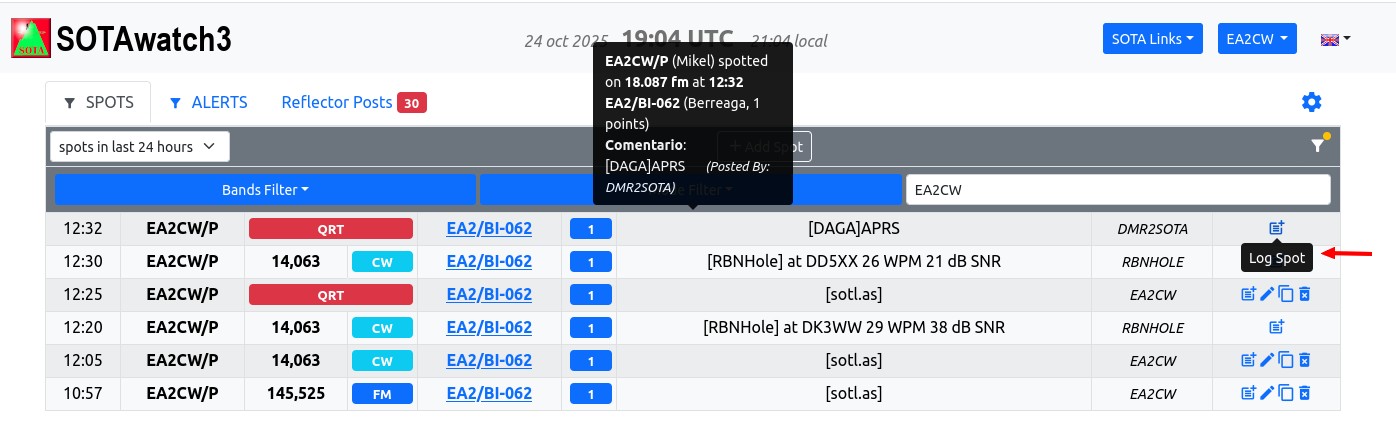
Even more, if you see the description, appears “spotted on 18.087 FM at 12:32”. But then that 18MHz spot does not appear on sotawatch. I did not work on 17m today. Neither CW nor FM.
There were 7 activators today at EA2, I guess there was just a mistake…
Curious that if you click on the 1st QRT spot, some fields (band and mode) are empty, but on that particular one, “18.087” and “FM” filled the correspondant fields… Where that info comes from?
It was submitted by whatever app or website that was used to post the spot.
What is needed is to either remove the ‘log’ button for QRT spots, or ignore any frequency info that is passed in with a QRT spot. It will get fixed eventually. Minor bug, the workaround is ‘don’t log QRT spots’.
If the spot list updates just as you click on a log-it button then the button under your cursor may suddenly not be the one you were aiming at. If you don’t notice the details are different…