As we get closer to 2026 and with the 144/430 MHz Challenge on the horizon, a few days ago I wanted to check how healthy these bands are in SSB/CW. To do that, I tried to look at the Activator Honour Roll and filter it by “JA–Honshu – All Years – 144 MHz – SSB”, but the “Loading…” message has been stuck for days.
No matter how many times I switch to another association, the “Loading…” for “JA–Honshu” remains unchanged.
I’ve logged out and back in, and even tried different browsers, but every time I open the Activator Roll of Honour, the “Loading…” keeps mocking me.
73 de JP3PPL
Same for the 144 mhz SSB search in W1. Changed it from All Years to a single year to lighten the search load but… LOADING…
1 Like
Yes, at first I thought that because of “All years” it would take a while to load… It’s been more than 3 days now hahaha
Heh Heh, you’re just going to have to get off that 300 baud dial-up ;modem!
2 Likes


OK, it’s a terrible SQL query that’s been inherited from old code from back when the database was a lot smaller.
Everyone: Please do not keep trying, you’re just loading the server up more
I’ll push a fix later tonight.
2 Likes
Artists impression of how SQL manages system resources:

3 Likes
Should be fixed now.
A lot of the more specific queries like that one date back to the original code back in 2004 vintage. They didn’t have all the index tables needed but it didn’t matter as the DB tables were small.
What happens is with no or missing indexes, the DB has to read an entire table of data to find what it wants. Some queries require multiple table reads. When the tables were small, say 1000 activations in total in the DB, a full scan may take 100mS. If that is increased to 10000000 activations the scan takes 1000 times longer, or 100seconds. If you have to scan all the tables then the time becomes enormous.
One way is to build specific index tables which means instead of scanning a table over and over, the DB scans the index to find which rows in the table it wants. Back when I was writing the code, we had a query that suddenly took far too long because the tables were large and we were looking for specific years. It would take about 42secs to find all the data. I created an index on date and something else and the query took 0.6 secs. But the cost of indexes is they use up disk space. When I last looked something like 45% of the database file was just for index tables. i.e. we had almost as much index data as we had QSOs and association data!
You can also produce better queries. The EXPLAIN function lets the Admins see where all the time and file access takes place. It often suggests adding indexes to help. But sometimes you can reorder the query to help minimise repeated scans.
Also when these queries were originally produced we had a hundred or so SOTA participants and the DB was idle most of the time. Now we have tens of DB requuests per second. So if you had a slow query it would get slowed further by every time some logged a QSO or activation as the data is locked during the writes.
Finally, the DB engine runs on a dual core Xeon server with SSD drives. However, it’s a virtual machine so yes, we have 2x 2GHz worth of Xeon CPU power, 4GB RAM and fast SSDs, they are not all ours. We probably run on an 80core monster with TB of memory and disk and we get “some of it”. When all the other VMs are busy, we may well find that our server is a little slower than usual.
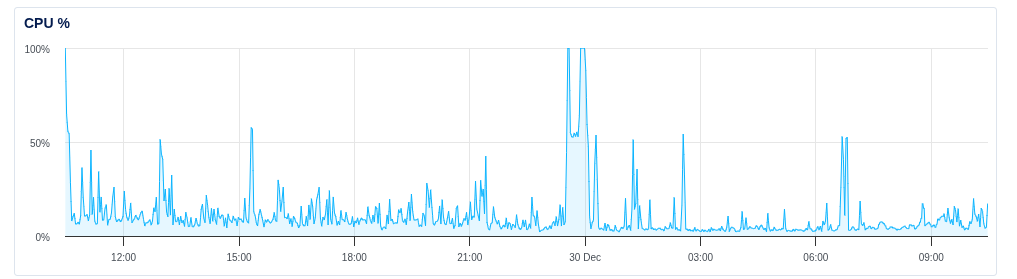
Here is a graph of the DB CPU load over the last 24hours… you can see when the “sub-optimal” queries were running 
There are probably more queries like the one that was fixed in the code. There’s no point wasting time improving them when more important stuff is needed. Once they become an issue, then we fix them.
1 Like