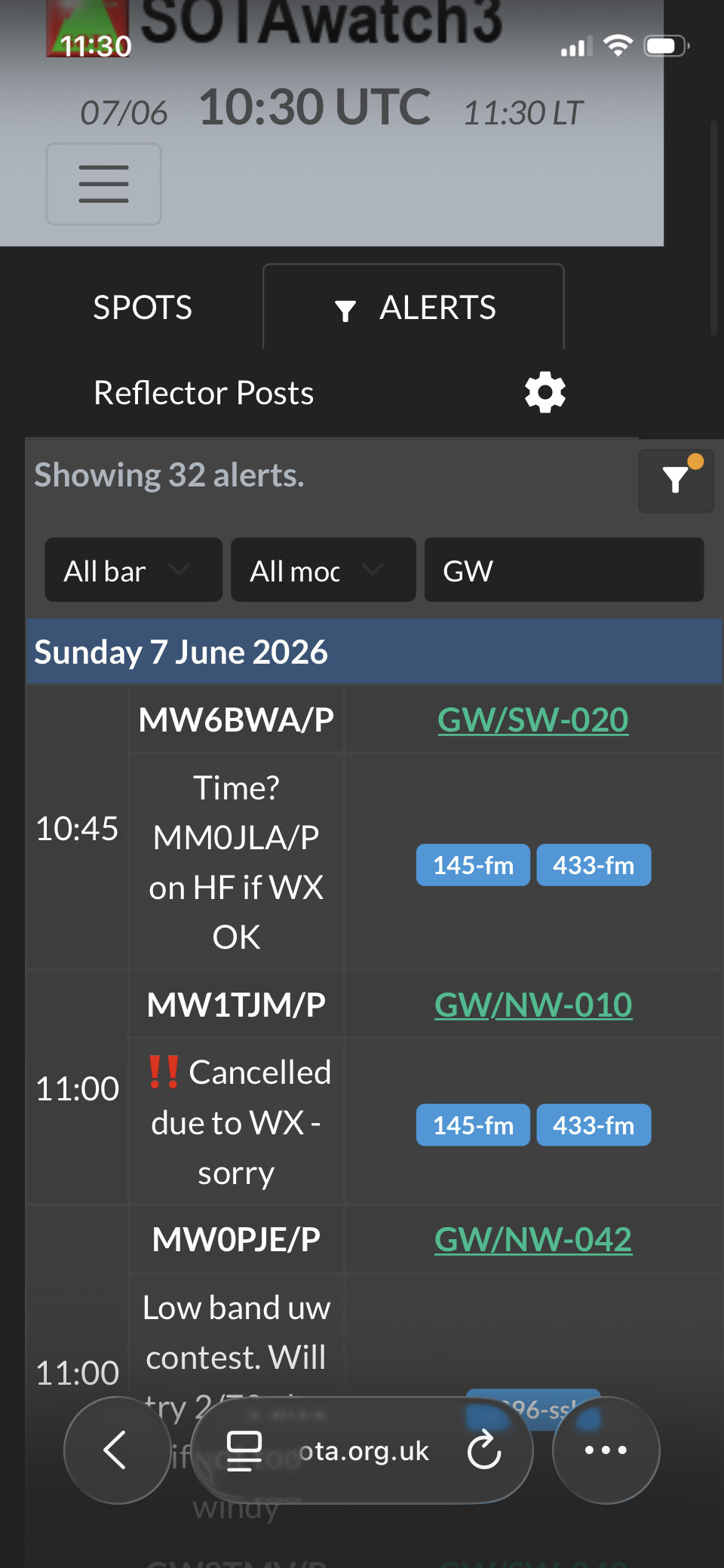
I asked my online ‘friend’ why the grey-on-grey fix works on most platforms but not on the iPhone. As a complete non-expert on this topic, I pass it on here without comment in case it might be relevant:
While PCs and Androids use engines like Blink (Chrome, Edge, Opera) or Gecko (desktop Firefox), every browser on an iPhone is essentially Safari with a different interface. If code is not explicitly written to accommodate WebKit’s unique way of styling input boxes, the fix will fail on iOS across the board.
The developers likely used a standard CSS fix (such as color: #ffffff; ) that works on mainstream desktop and Android engines, but neglected to override Apple’s hardcoded iOS user-agent stylesheets.
It then described three common WebKit quirks and how to overcome them. I won’t cut & paste all that text here in case this is all an AI hallucination but they relate to: 1) Missing color-scheme Property 2) Lack of -webkit-appearance: none; and/or 3) Implicit Overrides
Yes, I cleared history and website data for Safari and tried it again today before posting the above.
As I understand it, WebKit is Apple’s core web browser engine, Are you saying, the problem cannot be related to lack of compliance with WebKit?
I read [not on chatGPT] that the dark mode grey-on-grey text and background glitch is a notorious issue unique to iOS WebKit. Android (Chromium) handles automatic dark overrides much more flexibly, whereas WebKit rigidly forces system-level fallback colours or fails to repaint specific elements during transitions.
I just asked a friend with a iPhone to test and he says it is working for him in Safari, just tested then. It works for me on Android mobile.
We don’t use dark-mode detection at any point. We use a styling engine that automatically applies quirks to the CSS styling to handle multiple different browsers that exist out there. The relevant themes are applied based on your theme setting, not your browser preference.
Now, the next step is I can force a cache invalidation of all of the edge servers that serve the app, but I’m loath to do that, because that means everyone’s browser will fetch SW3 as if it’s a new version being available. I’ll trigger a rebuild for you which has happened several times in the past few days, so that won’t be anything new, but it may just change what happens for you at the edge.
I’ve done some testing work since I found exactly which field was being complained about.
(main PC)
Using PC Linux Debian 13.5 Brave v1.91.168 (Chromium 149.0.7827.54)
Switch to dark, check filter text, comes up in white on black. Switch to normal, text is black on white. Working.
(phone)
Using ARM64 Android 14 Brave 1.91.169 (Chromium 149.0.7827.59)
Switch to dark, check filter text, comes up in white on black. Switch to normal, text is black on white. Working.
(old “burner” phone for tests etc.)
Using ARM64 Android 9 Brave 1.78.81 (chromium 134.0.6998.166)
Switch to dark, check filter text, comes up in dark grey on black. Switch to normal, text is black on white. Switch to dark, comes up in dark grey on black. Use Brave “delete all browsing history”.
Sotawatch back to normal, confirms data for dark mode save on phone not elsewhere. Switch to dark, check filter text, comes up in dark grey on black. Switch to normal, text is black on white. Switch to dark, comes up in dark grey on black
Hard restarted phone. Again deleted all browsing data. Still dark grey on black. Deleted all browsing data and finally started working with white on black text in dark mode.
I don’t know why it took several attempts to clear the data but it did and only now is it working. This is an old version of Brave and is a few versions behind the last version for Android 9 (very old in software terms). I will have to search out the last version Brave that runs on Android 9 whilst it is still available. It looks like this phone will fall foul of security updates (SSL/TLS etc.) soonish.
I’m not sure if this helps you Andrew @G8CPZ but it took me several attempts to make it work. I didn’t have to do anything to make it work on the up to date Android phone.
There’s several layers of caching, not just at the browser level, but also at the CDN. We’ve seen similar issues eg with the localisation code, where people were being handed the wrong language version because the edge CDN would cache the language cookie and ignore changes to it. Your experience will be due to hitting a different edge node in the CDN.
I forced clearing of the Content Delivery Network cache by switching off my home broadband which forced iOS to use the 5G network. The Alert filter is now white text on black background [Hurray!] and - as expected - works when reverting to my broadband.
But sadly the Spot filter is still black on black.
Did you try typing into the Spot filter as well?
BTW: I’m typing this using Firefox Focus on my iPhone which is showing white text on a black background (and did so prior to clearing the CDN cache). Maybe it’s different software from SOTAwatch.
OT but related. Trying to update the burner phone to the last version of Brave to run on Android 9 got me in a right mess. Nothing wanted to install. I deleted the old Brave and tried again. Bottoms! Now no browser other than Chrome which is so old it doesn’t work on SOTA sites. Round and round and round and round. Then it stuck me… the CPU in the phone is 64bit ARM but Android 9 is only a 32bit system. I’m so used to everything being 64bits that I was downloading 64 bit apps. Back to Github and download the version that was installed but the 32 not 64 bit version… Boof! We’re back in business. Then I updated it to the last 32bit Brave for Android 9 and everything working.
This is just a reminder to make sure you try and install the correct version, especially when you’re and ‘expert’ like me
Here on G/LD-056 using Firefox Focus on my iPhone the Spot filter in SOTAwatch (in dark mode) is now working correctly (like the Alert filter). Has the code been updated or - by being away from home - has it finally drained the (intermediate cache) swamp, I wonder.