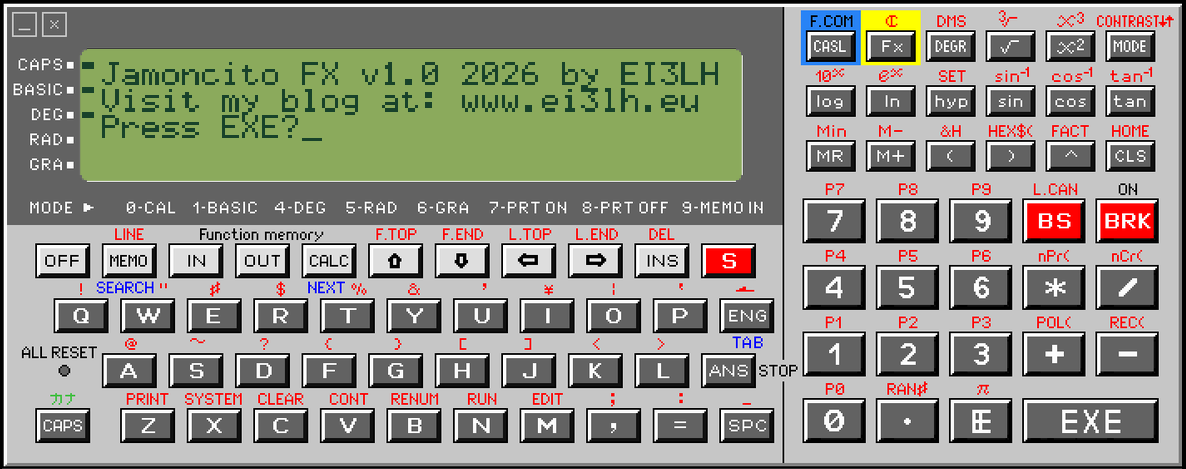
Introducing... Jamoncito FX Logbook Software!

Buenos noches.

So, thanks to Mark @M5TEA I fell down the rabbit hole of calculators (again). I do love a good calc.

Anyway. I couldn’t stop fiddling with Mark’s FX-870P emulator (insert euphemism / Kenneth Williams’ ooh matron! gifs here). So much so that I decided to try and 50/50 vibe-code a piece of software for it.

I put together a little Ham2k PoLo-esque (but nowhere near as good as PoLo!) program for the calculator which could log QSO’s. More importantly, you could then export your logbook to *.csv to convert to *.adi or whatever you want.

I call this technological marvel…

JAMONCITO FX!

(literally Beef Shank FX, but anyway :laughing:).

I have the gubbins of it done now and it’s relatively bug free. I wrote about how it works, the features etc on my blog (shameless plug but saves regurgitating here) along with some snazzy screenshots to ‘whet the aul whistle’!

Anyway. Thank you Mark for the brilliant emulator and all your hard work. Also to the original version authors too of course. My software will be FOSS and available once I have the last few bits worked out.

I am hoping folks may download it, pull it apart, improve it, optimise it and whatever else you can think of. If anyone has one of these calculators, I would dearly love one to try this on real hardware - even just to see it running live would be fantastic fun. I’d use it for an activation attempt!

Anyway. I hope you like this bit of fun. Nothing serious, just a ‘why not?’ moment that popped in my mind. Full info and details of features is here:

Thanks all. Toodlepip!

EDIT: Massive improvements made already. I’ll post an update later on and potentially publish the code tonight or tomorrow (because everyone is dying to use it… :rofl: )

4 Likes

Code is now published (with LOTS of improvements).

I don’t really understand the workings of Github so please feel free to tear it to shreds and laugh at the very poor software etc. Remember, it’s only for fun and just trying to help out by doing something new for the community.

Work away! :blush:

2 Likes

A brief update as mentioned previously on what I’ve added in to v0.2a:

  1. Removed loads of wasteful lines of code that produced input prompts when you review your QSO details. It was just a really inefficient, clunky way to view log entries.
  2. QSO’s can now be reviewed over two pages. Use the arrow keys to scroll through the log book entries ‘at your lee-shure’!
  3. Data export mode now tells you your RS-232 or Floppy drive is/is not connected prior to export. Something weird was happening with the COM port opening and closing all the time as well during this procedure and occasionally caused the program to fill it’s pants. A manual reset would then lose all your data.
  4. Set a requirement to set the time and date before you do anything with the software. Setting the time and date then carries over to log entries.
  5. I can’t get an RTC call to work. I don’t know if the hardware has an RTC, I get conflicting information. With no RTC to work with (for now, and even if it doesn’t have an RTC I have an idea to implement one - a genuine one) I implemented a clock that can be calibrated manually - basically enter the time, press a key, count 60s, press a key. It’s really crap and will be subject to drift, but it is the best I can come up with for now.
  6. Added a Standby mode so between QSO’s if you enter standby mode it restarts the ‘RTC’ countwhile you call CQ or go QRX or what have you. This is why the clock will be subject to drift but is the best way I can implement it. You can still input time and date manually at QSO entry, or leave the fields blank and it will use the calibrated time and date you set at boot.
  7. Added a PRINT menu option. Connect a Casio printer to the RS232 port and you cam print your logbook to an electrostatic printer! I have also formatted the output so it fits correctly within the confines of a Casio printer. You can check this for yourself as the emulator will spit out a *.csv file even with no printer connected.
  8. Reformatted *.csv file export to read better.
  9. Added a PLAN menu option. This serves as a quick reference card in the field. I haven’t implemented it fully yet but it is mostly there. You can scroll through the reference card using the arrow keys.
  10. Lots of little tidy-up’s. Removing wasteful code freed up more space for log entries. You should be able to add between 30 and 1000 contacts. Why the huge range? It depends on your calculator model. 8kb of RAM and no expansion board will allow for about 30 to 50 contacts, depending on how much data you add in the Notes field of your QSO’s (i might put a char limit on that field to effectively cap the QSO limit more effectively to save ambiguity). If you have a full fat, tricked out and fully loaded Casio hyperbeast Pocketcon then you should get about 1000 QSO’s logged easily before an OM error.

That is it for now. I want to add some more features, particularly a SAVE mode. Maybe using battery backup. I dunno.

I would also like to convert the software to C or Machine Code, so it would run faster. The BASIC version runs fine but I think converting the software may be a better option. I tried yesterday to use the cross compiler but couldnt get it to work. My level of development skill on show right there! :sweat_smile:

I hope folks enjoy this little program. I am not very good at this stuff (not a humblebrag, I am just not a developer or a UI/UX specialist - I do like silly, obscure stuff nobody else gives a hoot about though, hence this software attempt!).

This is all Mark’s fault anyway. :grinning_face_with_smiling_eyes:

EDIT: Forgot to add, in the PRINT menu, you can now also select a specific QSO or a range of QSO’s to PRINT. This could save paper if you only want certain records rather than printing everything. You can also print just one record if you wish. Up to you. I would like to add a similar ‘search’ feature to the logbook. Perhaps search by date, time, callsign etc. It can’t be overly complex though so it doesn’t eat up precious RAM!

5 Likes

While I work away on Jamoncito FX, I started a side quest for another piece of Casio Calculator software that everyone was kicking my door in and writing letters to their local MP about and demanding I make it… yeah right! :laughing:

What if you are out portable and you suddenly realised you forgot your straight key, your paddle or your bug!?

Goodness me what a palava! What to do?!

Luckily you always remember to bring your Casio Pocket Calculator with you everywhere you go don’t you? Of course you do. So why not use a calculator as a straight key or a paddle?

Hold on a sec while I go put on a black polo neck jumper

Today, I introduce to you…

Jamon FX: Type R

A dedicated CW key for your Casio Pocket Calculator!

It is very much in the alpha stages (and will be for a while as Mark @M5TEA has now unkowingly made me get a Casio Pocket Calculator - so I bought one :sweat_smile:). The base software works but to be 100% with it I want to make tests on real hardware as well as the emulator.

Essentially how it works is it bypasses the RS232 and uses the 2.5mm headphone jack (which also doubles as a data connection!). Thus I’ve put together a program which will send your dits and dahs over the data connection either to something with a built-in keyer e.g. an Elecraft KX2, or, with the aid of something like a Picokeyer, it will leverage that to then send on your dits and dahs.

I’ve incorporated a straight key and iambic key at present. Not sure I can add a Bug option but I can try. Code is sent via key presses on the keyboard either by duration (straight key), or two preset keys (dit and dah). WPM should be determined by the external keyer.

Anyways, just a sneak peek at this to show it’s off and running. I have it working 100% via emulator, I just need the real thing to make sure all is ticketyboo first before I sink more effort in to it.

I’ll release the code as FOSS of course once it’s all done. This is just a heads up to say it is coming and to control your excitement. :laughing:

Screenshot of the (very much) alpha software:

Side Note: I made this in to a new thread so it doesn’t get lost in the Jamoncito FX thread (which has generated some interest on the QT, thanks folks who messaged me, read the article and all the rest of it. I hope this silly software brings a smile to fellow jamons and/or those concerned I should maybe institutionalise myself for making odd software and stuff!)

  1. :blush:
1 Like

:sweat_smile:

But I respect the playful experiments with those calculators

7 Likes

Those are wildly optimistic numbers! :rofl:

5 Likes

Venn must have been an optimist… i remember having a thing vaguely like that, before I went into Palm pilot etc. I don’t recall any programming options. But with legs crossed and a few magic incantations I imagine that was the next step…

2 Likes

Was it a Psion? Those were powerful devices and had a decent market share for a while. I think you can run Linux on them too?

Kludged Linux:

A decent little docu on Psion:

I think the reality was the pace of technology overtook them and they never caught up. For a brief moment though, Psion were the bizzo.

3 Likes

No it was a completely different beast, Sharp - styled as a personal organiser.

1 Like

Oh nice! Was it a G series, E series or something later? Sharp made some amazing pocket calculators.

By the way, I was at EI/IE-022 today and could have done with Jamoncito FX as I left my blower in the car and also hadn’t packed a notepad.

Luckily I was able to borrow Mini Ted Nugent’s blower and scrawl QSO’s in crayon on some art pad app thing. :grinning_face_with_smiling_eyes:

See now if I had a calculator on me and Jamoncito FX I would’ve been okay! So. Golden rule. Next time you SOTA, don’t forget your calculator!

I got 5 contacts on 2m and 70cm. Tried CW on the KH1 and it was absolutely dead. But to be honest this was a toepoke hike for fun and I just wanted to offer up the activation to try and help out anyone chasing for a chase or complete.

A great day out and I also got @EI4JY on 2m and 70cm it was great to hear from Alex again!

Looking forward to my VX-4 showing up in a few weeks time and I will try out both programs in the real world. :blush::+1:

2 Likes

Just use an android tablet with vk port-a-log. Store in side pocket of pack. Upload log files using autosync. Take it out of pack only to recharge. No pencils or crayons required. If using notepad or text editor record in fle format. Make life easy. Work smart not hard. Etc.

73 Andrew VK1DA/VK2DA

1 Like

I just don’t get on with screen based keyboards. Fat fingers, laziness bourne of using a device that is actually fit for purpose, who knows.

For the same reason I like my cars to have proper buttons and knobs - I’m sure most people are aware of the increase in road fatalities in the years since the introduction of the ‘glass screen’ interface.

The sweet spot for portable logging with a device, for me, is to have both flexible software and an interface I can use with gloves on, if I have to.

Vive la différence!

4 Likes

Prototyping some ‘next generation’ :face_with_peeking_eye: Casio Pocket Calculator CW stuff for all minus 37 jamons on Earth who may be interested. :star_struck:

2 Likes

What about something a bit more updated?

This fairly cheap calculator would be perfect for logging QSO?

Physical keys, LCD Display. Battery lasting forever, Even backlit keyboard for logging in the dark.
SD Card to get the logs transferred.

73 Joe

3 Likes

Nice project :clinking_beer_mugs:

I suffer from the same disorder - I wrote a SOTA logging program (in BASIC) for my TRS 80 Model 100 last year. I actually used it quite a bit - the Model 100 has a VERY nice mechanical keyboard. I store the logs in FLE format, and use the serial port to upload them. My plan is to eventually have an ESP32 based ‘helper’ card connected to the serial port for network access (direct log uploads, etc.).

I also wrote a simple Morse code trainer program for the Model 100 that sends a word and then waits for you to type in what you copied. It pulls the words from a CSV file, so you can customize the words that it sends. The sound is generated from the internal piezo buzzer and sounds pretty decent.

Working with ancient tech is fun. These old machines are still capable of useful work!

3 Likes

@M5TEA it works! My 2.5mm FTDI RS232 loves your FXsend software!

It took a sec to figure it out but I MUCH prefer FXsend over Minicom which never worked properly for this task and the VX-4 quirks.

I tried a VM with W10 for PCB-1000 Data Communicator 32 but the install just does not work at all. I spent ages earlier trying.

FXsend worked at second time of asking. Why second time round? My *.bas file has a line in it that exceeds the char length permitted for data send.

Amazingly, my software works really well. Only thing I will need to update is the RS232 output code. It does export but has no predefined route to export to! That should be an easy fix.

I do have 3.5" and a 5.25" floppy drives as well as I have a Kryoflux kit I use them for. I will test floppy drive functionality at a later date.

Looking good so far sir! Thank you so much for the brilliant software and the utilities. You saved me from pulling my hair out and having a Connery with your brilliant FXsend toolkit.

Ouef sur la plage! Je suis, je reste! :star_struck:

Bonus @M1GEO 3D print on my utterly catastrophic desk. :face_with_peeking_eye::blush:

2 Likes

While working on a QSO logger and a CW key, both for an ancient pocket calculator…

I decided to push the boat out and make a true telnet BBS on a physical Casio VX-4 calculator.

Again, this is entirely @M5TEA fault that I am obsessed with these calculators and making CW / amateur radio stuff for them! :face_with_peeking_eye:

Shoddily made video follows. Note the BBS is very much in alpha and also contains errors (a glaring one is the about page says I am using M5Stack gear when I am not, I am just too tired from making this thing work to go back and edit the code!).

A full write up and photos as proof will follow on my blog when I get a sec.

Just to state on record that for me, as a total novice at this stuff (the dev side, that is), this was really bloomin’ difficult to get to work.

I’ll explain in the blog but cripes it was a labour of love and a LOT of soul destroying troubleshooting and bug fixing.

All because I wanted this to be a genuine telnet BBS on ancient hardware. I nearly gave up on it.

Glad I didn’t though and yes I will make this open source if anyone is bonkers enough to want it!

72 :blush:

2 Likes