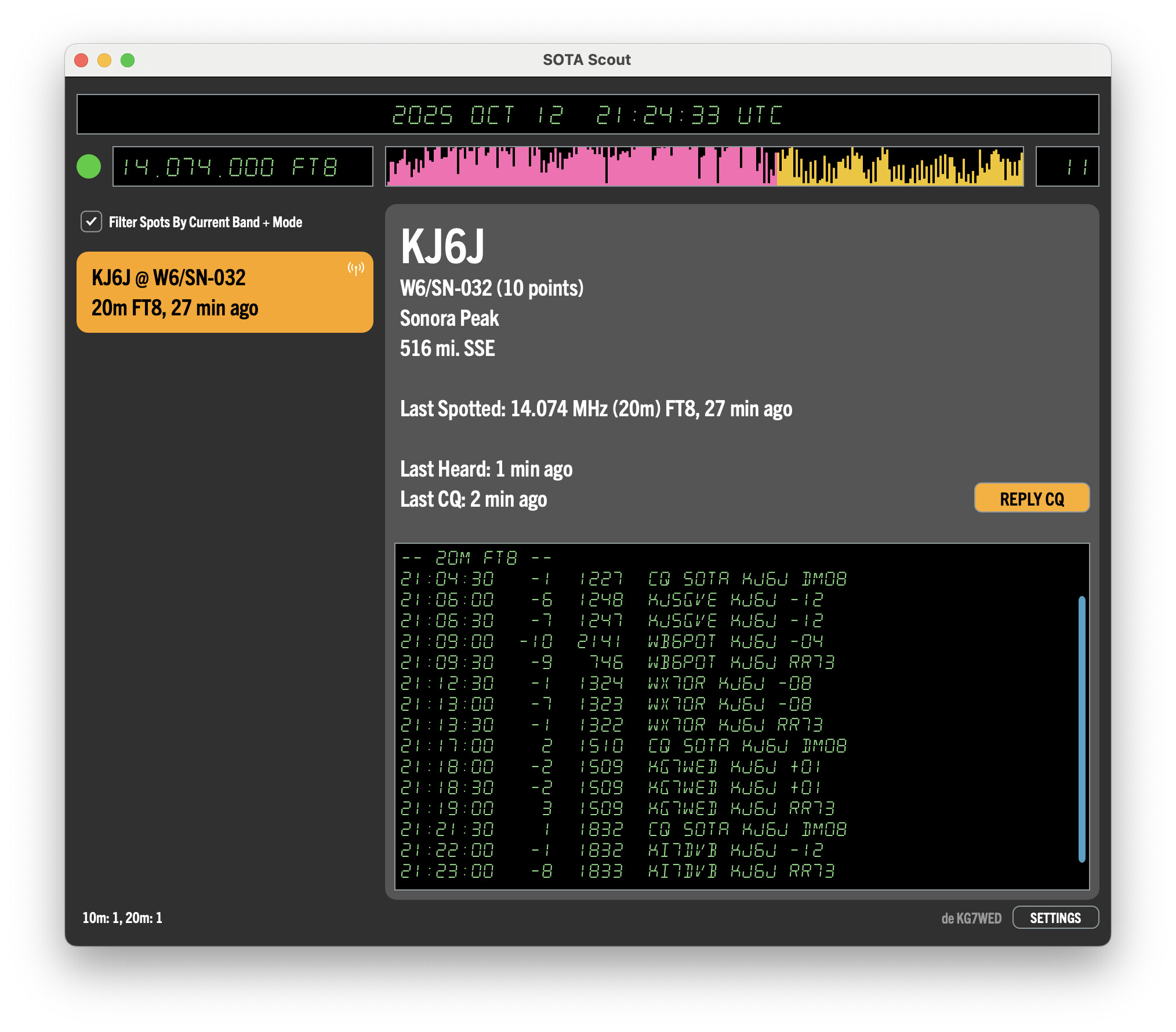
I have been working on this new app for a few months, and now that it has reached a decently usable stage, I wanted to share it here at last.
SOTA Scout is a desktop app for chasing SOTA activators using FT8 and FT4. It bridges data from spotter APIs with remote control of the WSJT-X application, to help you locate and work activators in the vast sea of FT8 messages.
It also works with the POTA API, so on days when there’s no data mode SOTA activations happening, you can still practice with it.
You can grab the download here:
There are currently macOS and Windows versions available. Because WSJT-X can communicate over the local network, SOTA Scout can be running on a different computer. For example, for my setup WSJT-X runs on a Raspberry Pi 400, and SOTA Scout runs on a Mac laptop.
I sure hope this catches on. As an activator who uses digital modes when needed (several activators on the same peak, difficult DX, a Challenge, only having access to a QDX radio, etc.) I have noticed that I rarely have anyone log a chase for my digital contacts. It turns out that I like seeing the chaser’s confirmation that we made contact.
Thank you. As for open source, I like the idea in theory, and I’m happy to share the knowledge. But I don’t know that I have the bandwidth to take on managing a public repo right now.
The whole app is coded in C++ and it uses the JUCE framework extensively. Happy to talk more about the development side of it, if you have questions.
You don’t have to manage a public repo. All the code for my home brew transceivers is on GitHub. I did write some documentation but it’s out of date now. Anyone who wants to use the code just has to accept it as it is.
App seems to work well and was easy to set up. Not sure if it is looking for alerts that include digi mode, spots or self-spots specifying digi mode, people using “SOTA” as secondary text after their CQs, or some combination thereof, but there does not seem to be much traffic that meets the criteria. I thought perhaps I had not configured correctly, until I checked the box to include POTA spots, then saw quite a few. Likely that not very many SOTA activators are using FT8 or FT4, and some are just handling as regular FT8/4 CQ’s without attempting to self-spot or otherwise flag as SOTA-related. Perhaps this will change over time. The app certainly makes it a lot easier to dig a SOTA FT8/4 CQ out of the pile, especially on 20m.
Hi Ken, sorry I somehow missed your reply here. Glad to hear the positive feedback on the easy setup for SOTA Scout.
To fetch the available digital SOTA spots, the app calls the SOTA API with a URL that asks for the 10 most recent spots, on any band, with mode “DATA”. So it’s the same results that you would see on the SOTAWatch page, set for “latest 10 spots” and with the Mode Filter set for DATA only.
The app isn’t pulling anything from alerts, just spots. Maybe I should add alerts, though, if some activators use alerts, but never wind up adding actual spots. I hadn’t thought of that before. Because of the app’s emphasis on real-time data, I had focused only on spots.
In any case, you are correct that most days, there’s not much SOTA traffic that meets the criteria! That’s one reason I also included POTA spots, so that even if you’re not interested in working parks, you can at least practice with the app and get a feel for it.