When trying to contact AM using Summits on the Air contact forms, I always receive a “No captcha provided” error, and message apparently not being sent.
Tried several web browsers with the same result.
73, Mikel EA2CW
This has been an intermittent problem that we have seen lately. My findings:
If you don’t see the captcha, open up a ‘private browsing window’. This has worked for me on Chrome and Firefox. Weirdly, on Safari I NEVER have this problem - the captcha always loads reliably.
It doesn’t seem to be related to any specific plugin/extension as far as I can tell.
2 Likes
Privacy/adblocker extensions can interfere with CAPTCHAs, same with pihole/adguard and other whole network DNS blockers.
1 Like
Already tried 4 different browsers on normal / anonymous mode without sucess (firefox, chrome, brave & vivaldi). No adblocker extensions.
Thank you for your answers.
73, Mikel
1 Like
I just tried on this an old Android phone running Brave. (Brave 1.76.81 Android 9). Brave shields were up. I selected the Contact SOTA link and the full page loaded but no Captcha. I was looking at the options menu on Brave to find the version when the Captcha loaded and appeared, maybe 45-60 seconds after the rest of the page.
Maybe try waiting for while may fix it for you. And yes it’s annoying but I don’t know the true fix yet.
1 Like
Checked that, the captcha appears after a while, ask for “buses”, validated, and then the page says “no captcha provided”
I found a suspicious message inside the captcha, can it be the source of the problem?: “Take action”
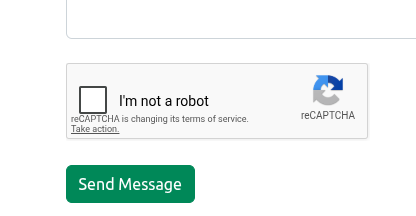
1 Like
Yes, same happened to me. After signing in I have some text that I will send to Andrew for him to check.
1 Like
The form sending seems to be working fine now, thanks.
Fixed the system to prove a robot can not know which are traffic lights and which not 
Mikel EA2CW
1 Like