Anyone any good in understanding APRS/Direwolf APRS logs ?
Just rebuilt my Pi+SDR APRS Igate and while it works it appears that some packets are being received OK by my I-gate but another station further away also gets the packet but somehow gets it first
For example
APRS/Direwolf APRS logs - M0VAZ-10
2026-05-19T21:25:23.734327+01:00 lister-aprs direwolf[732]: M0VAZ-9 audio level = 75(10/8) |||||____
2026-05-19T21:25:23.734808+01:00 lister-aprs direwolf[732]: [0.2] M0VAZ-9>USRSWU,WIDE1-1,WIDE2-1:y_Vl j/"4&}_%<0x0d>
2026-05-19T21:25:23.735164+01:00 lister-aprs direwolf[732]: MIC-E, JEEP, Yaesu FTM-400DR, Off Duty
2026-05-19T21:25:23.735440+01:00 lister-aprs direwolf[732]: N 53 23.7500, W 003 07.5800, 0 km/h (0 MPH), course 4, alt 15 m (49 ft)
Shows in my log but my packet was picked up / sent to APRS.fi by 2E0BCI and not by my station m0vaz-10 (which is closest, but fastest finger first I guess)
As far as I know the typical behavior of APRS (APRS-IS Internet Service). It sometimes is just the faster ping of the internet connection that matters "who” is reporting first. Already known packets are ignored by design.
I’ve had a similar experience where my tracker is reported on aprs.fi by an igate on the other side of town rather than the one in my loft. It’s normal.
I am not quite that slow but do have 38mb/10mb or there abouts.
Just interesting looking at the stats and where I am broadcasting from and where the packet is picked up.
Also going to experiment with antennas to see if that makes any difference to packet reception.
Currently on a discone external antenna rather than an in the loft 2m antenna
I have noticed something similar, that when I am down in Hertfordshire, I am literally line of sight and can actually see the mast that MB7UC (GB3PI) is on, yet I am being reported by MB7VH, VH is slightly closer but isn’t line of sight due to being on the North Eastern ridge of the Chilterns, the horizon north is literally half a mile, lots of trees, houses, between where I usually am and VH
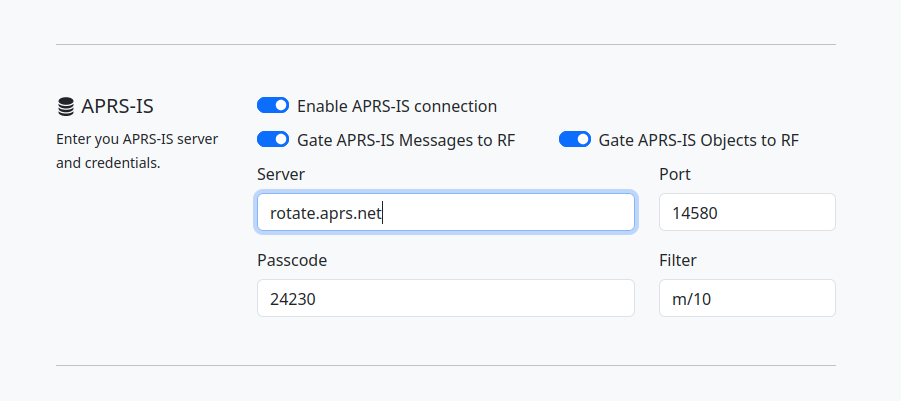
It’s because of the hierarcy of APRS-IS secondary servers (running aprsc) distributed around the planet, which are designed to filter out duplicates. When you configure your iGate, you will see “rotate.aprs.net” specified in the “APRS-IS” server section:
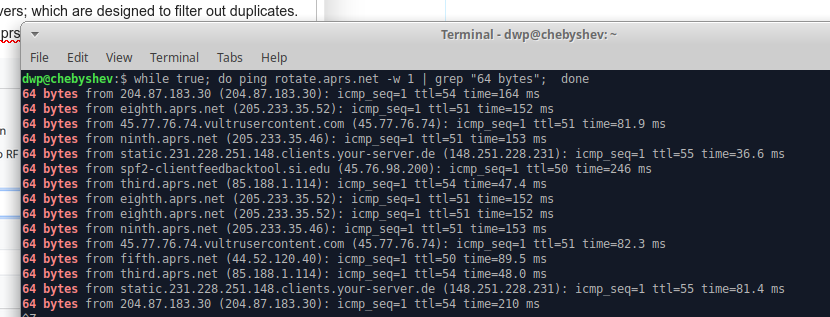
“rotate.aprs.net” is dynamically mapped by DNS to a list of secondary APRS-IS servers (A records for you DNS nerds) which are geographically distributed around the world. This is to ensure there is some degree of load balancing.
If one repeatedly pings “rotate.aprs.net”, the server that response changes regularly:
So if your live in Europe and your iGate is assigned to a server in Australia/NZ (by DNS), when it receives a RF APRS packet, it will take a lot longer to forward it to (over the internet) to the primary APRS-IS server through the secondary server allocated:
dwp@chebyshev:$ ping aunz.aprs2.net -w 1
PING aunz.aprs2.net (45.248.50.37) 56(84) bytes of data.
64 bytes from vk7hse.rb3011 (45.248.50.37): icmp_seq=1 ttl=48 time=263 ms
than if it it had been assigned a secondary server in the Europe:
dwp@chebyshev:$ ping euro.aprs2.net -w 1
PING euro.aprs2.net (51.83.187.31) 56(84) bytes of data.
64 bytes from vps-ee58364b.vps.ovh.net (51.83.187.31): icmp_seq=1 ttl=49 time=47.3 ms
You can of course fudge this by replacing “rotate.aprs.net” with “euro.aprs2.net” (if you live in Europe); but I suspect this advice will make the “Elders of the Internet” cross.
Thanks Dave
The config screen in your screen shot is not one I have seen before.
My config is set to use euro.aprs2.net as per the config when did the install.
It all comes down to latency. APRS doesn’t care about signal strength as long as the packet is decoded successfully. Multiple iGates can forward the same packet to APRS-IS, but the first packet that reaches APRS-IS “wins” the race — all subsequent duplicates are dropped.
A few tips to minimize latency:
Whenever possible, avoid using Wi-Fi for your iGate connection.
Minimize latency in the ALSA audio layer (if you run Dire Wolf on Linux).
Use a Tier 2 server with the lowest latency and the fewest network hops from your location: https://status.aprs2.net